TIME WARP SCAN: Face Scanner
- 4.6
- Rating
- 10.00M
- Installs
- Free
- Price

 Analysis by App-foxy
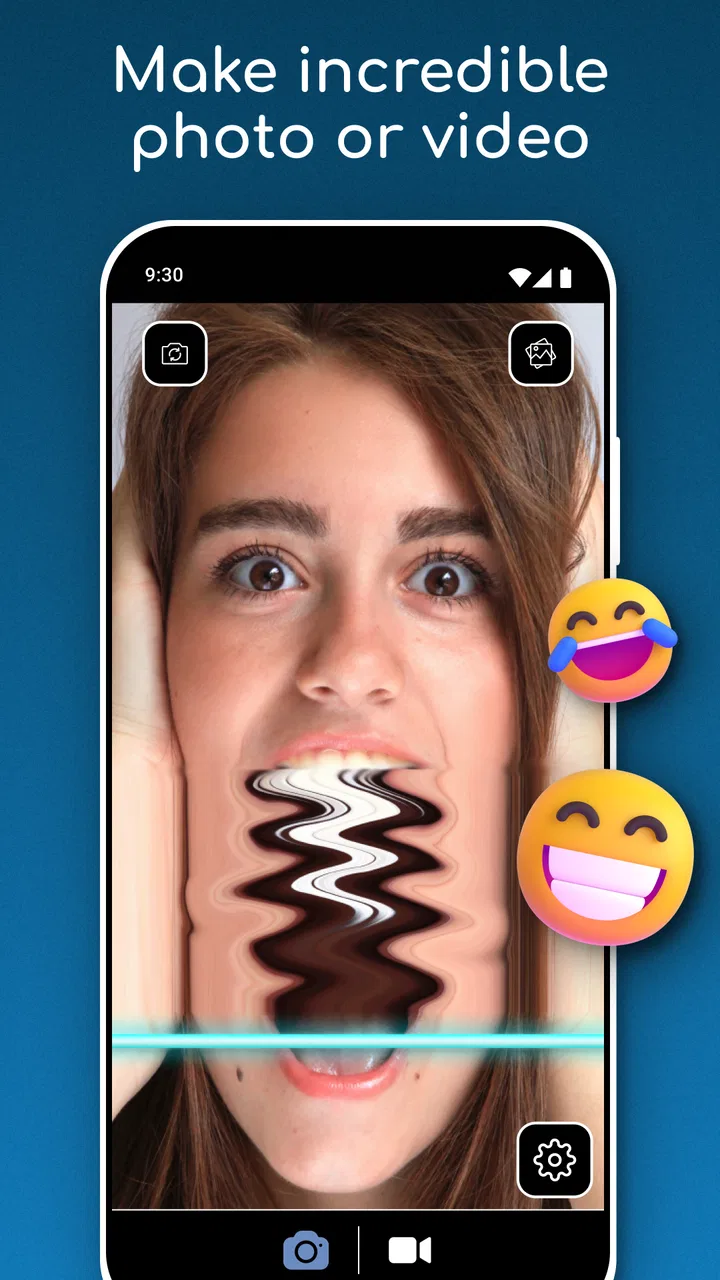
TIME WARP SCAN: Face Scanner is the kind of photography app I open when I want a quick laugh rather than a serious camera session. It focuses on the familiar time-warp effect that scans across the frame and changes the way a face or object appears as the capture progresses. The appeal is immediate: point the phone, hold still or move at the right moment, and you can create an odd, stretched, deliberately imperfect picture or video without learning a complicated editor.
That simplicity is also the central question for me. Is this something worth keeping installed after the first burst of curiosity, or is it better treated as a small novelty tool for a particular afternoon? After spending time with it, I see a clear place for the app, but it is a narrow one. It works best when I want the effect itself to be the joke, the visual surprise, or the starting point for a short social clip. It is much less convincing as an everyday camera replacement.
Why the first week feels so entertaining
The first few sessions are easy to enjoy because the app removes most of the work normally associated with creative photography. I do not need to build a composition in an editor, search for a filter after recording, or understand a timeline. The main decision is where to aim and how to move while the scan passes through the scene. That short learning curve makes it friendly for casual users, children with supervision, and anyone who wants a playful result in a few attempts.
You May Also Like

 Google Keep - Notes and lists
Google Keep’s Quiet Growth Shows the Appeal of Simpler Notes
As mobile work gets busier, Google Keep keeps winning a simple contest: capture a thought quickly, find it later, and get on with the day.

 Blood Strike: 2.5 Anniversary
Blood Strike’s Loadouts Turn Every Drop Into a Tactical Gamble
A close look at Blood Strike’s custom loadouts: how fast access to signature weapons reshapes its battle royale rhythm, rewards preparation, and narrows the gap between fights.

 Pandora - Music & Podcasts
Pandora’s Music Is Easy to Start, but Harder to Recover
Pandora’s strength is its low-effort path from a seed to a station. Its weak spot is how much confidence it asks you to place in connection, setup, and quiet recovery.

 8 Ball Pool
 Is Built on Rivalries, Rematches, and Routine
A close look at the rivalries, rematches, shared routines, and unanswered safety questions that turn a quick pool match into a persistent mobile community.

 Samsung Music
’s Quiet Strength Is Playing What You Already Own
Its reach comes less from spectacle than from dependable access to a personal library. That simplicity is both the app’s strongest retention engine and its ceiling.

 AccuWeather: Weather Radar
AccuWeather Review: A Quick, Clear Forecast for Everyday Decisions
For everyday plans, the best forecast is the one you can understand quickly. AccuWeather makes rain timing, radar, and local conditions easy to act on, with a few trade-offs.
More From Our News Desk



Faces are the obvious subject, but I found the effect more interesting when I changed the setup. A person looking straight at the camera produces a recognizable distortion, while a slow turn, a raised hand, a moving pet, or an object crossing the frame can create a less predictable result. The best clips usually come from treating the scan as part of the performance instead of expecting the app to make an ordinary snapshot exciting by itself.
The app’s store summary points directly to the popular TikTok-style time-warp scan, and that tells me what kind of experience to expect: fast, visual, and built around sharing a moment rather than preserving a natural portrait. It is not trying to compete with a manual camera app, a full retouching suite, or a gallery organizer. Its strength is the immediate transformation.
During a first week, I would use it for a group chat challenge, a silly birthday clip, or a quick experiment with a friend who has not seen the effect before. A realistic example is a rainy evening at home when everyone is bored: one person holds the phone steady, another slowly changes expression as the scan moves, and the group repeats the shot with different timing. The entertainment comes from comparing attempts, not from producing a polished film.
That timing is more important than it first appears. If the phone moves too much, the result can look accidental rather than intentionally distorted. If the subject moves too quickly, the scan may not create the shape I expected. I get better results by choosing a simple background, keeping the phone at a comfortable distance, and asking the subject to make one controlled movement instead of several at once. This is a small but useful workflow improvement that the short store description does not explain.
Another practical tip is to record several variations before deciding which one deserves to be shared. The first attempt often teaches me where the scan travels and how much movement is enough. On the next attempt, I can exaggerate only one element, such as an eyebrow, a hand, or a sideways turn. That approach produces more intentional results than waving everything at the camera and hoping the distortion looks good.
What the app is actually good at
I would recommend it to someone who wants a low-effort visual gag, a quick social post, or a playful way to break the routine of ordinary selfies. It is also useful for people who enjoy experimenting with motion and timing but do not want to learn advanced editing. The Everyone content rating makes it broadly approachable, although younger users should still follow the same common-sense rules about sharing faces and personal surroundings.
The app is less suitable for anyone looking for accurate portraits, dependable image quality, professional controls, or a broad collection of photographic tools. If my goal is a clean headshot, a carefully exposed landscape, or a well-organized personal camera workflow, I would use the phone’s native camera or a dedicated photography app instead. The time-warp effect is intentionally disruptive, so it is a poor match for subjects that need to remain natural.
It is also worth understanding the difference between a filter that supports a larger creative project and one that is the project. Here, the effect is usually the main event. I cannot rely on it to add much value to every photo in my library. That is not a defect in itself, but it limits how often I need it.
Whether the novelty survives from month to month
After the first month, the question changes from “Can this make something funny?” to “How often do I have a reason to make something funny in this particular way?” My answer is occasional rather than regular. The app can remain useful if I have friends who enjoy trying variations, or if I make short-form content where a recognizable scan effect fits the tone. For most people, however, the number of fresh ideas may shrink once the basic face distortion has been explored.
That does not make it pointless. A small app can earn space through rare usefulness, just as a party game may be valuable even when it is not played every day. I can imagine keeping this one installed for spontaneous gatherings, school-safe creative activities, or a recurring social account built around visual experiments. The recurring value depends on my habits and audience, not on a constant stream of new photography problems the app can solve.
One way to extend its life is to stop treating every recording as a finished post. I can use the effect as a visual insert: a brief opening shot, a reaction between two scenes, or a transition into a joke. I can also compare the same setup at different speeds of movement, use contrasting backgrounds, or create a before-and-after sequence with a normal camera shot followed by the scan. These workflows give the app a little more range without pretending it is a complete editor.
There is a trade-off here. The more I plan a clip, the more I may want tools that this kind of focused app does not provide. A longer project benefits from trimming, sound control, text placement, color adjustment, and reliable organization. If I find myself exporting a result and immediately opening another editor for basic finishing, the separate tools may be the better long-term home for the workflow. This app remains strongest when speed matters more than polish.
The popularity figures suggest that the concept has reached a substantial audience: it has passed ten million installs, carries an average rating of 4.6 from around 119 thousand ratings, and has about 2.3 thousand written reviews. I read that as evidence that the effect is easy for many people to understand and enjoy, not as proof that it will become a permanent part of every user’s camera routine. A high first-impression appeal and lasting usefulness are different things.
How it compares with ordinary camera alternatives
The built-in camera wins whenever I want dependable capture. It opens with a familiar purpose, handles normal photos more naturally, and does not force me to frame every moment around a single distortion. A conventional social platform may be better when I want a wider variety of effects, built-in sharing, music, or editing in the same place. A full photography editor is better when I care about correcting a result after the shot.
TIME WARP SCAN: Face Scanner has a different advantage: it gets me to the effect quickly and keeps the interaction focused. I do not have to browse through a large catalog of filters or make several editing decisions before seeing the point of the result. For a friend asking, “Can we make one of those strange scan videos?” that directness is valuable.
The trade-off is depth. A large social app may offer more variety but can feel cluttered when I want one specific visual treatment. A professional camera app may provide more control but would be excessive for a joke. The right choice depends on whether I value a narrow effect delivered quickly or a broader toolkit that can support many kinds of photography.
The maintenance burden is small, but not invisible
Because this is a focused effect app, maintenance is mostly about deciding whether I still use it often enough to justify its place on the phone. I do not need to build a complicated library around it, and I would not expect to open it for routine camera work. My own habit would be to keep it available during periods when I am making playful clips, then remove it if several weeks pass without a reason to launch it.
The current version is 6.8.3.1 and it runs on Android 8.0 or later, which makes it accessible to many older devices as well as newer phones. That broad compatibility is helpful if I want to use it with a family member’s phone rather than requiring the newest hardware. Even so, the experience can depend on how smoothly a particular device handles camera capture and movement. I would test a short recording before planning an important group activity around it.
The app is free to install, with in-app purchases ranging from $0.99 to $99.99 per item. That makes the initial trial low-risk, but I would still pay attention to any purchase screen and avoid assuming that every part of the experience is included without cost. A free download is not the same as a completely purchase-free tool, especially when the app may present optional paid items during use.
For me, the sensible maintenance rule is simple: try the core experience first, decide whether it fits my normal sharing habits, and only consider spending money if a clearly useful option improves the way I use it repeatedly. I would not pay merely to prolong the novelty. The effect needs to become part of a real workflow or recurring activity before an optional purchase makes practical sense.
The developer is ZipoApps, and the app belongs squarely in the photography category even though its purpose is more playful than technical. That distinction matters when browsing an app catalog. Someone searching for camera controls or editing precision may see the category and expect a broader utility than this app provides. I would approach it as a specialized camera effect first and a general photography tool second.
Where fatigue starts to appear
The biggest source of fatigue is repetition. Once I have seen the same basic scan move across several faces, changing expressions may not be enough to make each result feel new. The effect can also become predictable when the framing, background, and movement remain identical. To delay that feeling, I need to change the situation, not just ask another person to make a different face.
There is also a social fatigue factor. Not everyone enjoys being recorded with a distortion, and a funny result for one person can feel unflattering to another. I would always show the subject the result before sharing it, especially when the clip includes friends, children, or people who did not ask to appear online. The app makes capture easy, but it does not replace judgment about consent and context.
Another limitation is that the effect rewards preparation more than spontaneous photography suggests. A cluttered room, a moving camera, poor timing, or several people crossing the frame can make the outcome difficult to control. That unpredictability can be funny, but it can also mean repeating the same shot more times than expected. If I am in a hurry, the native camera is usually the less frustrating option.
I would also skip this app if I dislike maintaining small, single-purpose utilities. Its value is concentrated in one recognizable idea. Users who prefer an all-in-one social camera may resent switching apps, while users who want a professional result may find the distortion too limiting. The best audience is comfortable with a tool that does one playful thing quickly and accepts that it will not solve every photography need.
My long-term verdict after the novelty test
My honest recommendation is to treat TIME WARP SCAN: Face Scanner as an occasional creative accessory, not a permanent replacement for a camera. It earns a download when I specifically want a time-warp scan effect, when friends are willing to experiment, or when a short visual joke matters more than a polished production. Its directness is its most convincing quality: I can understand the idea almost immediately and start testing it without a long tutorial.
It earns lasting space only under certain conditions. If I regularly make short social clips, host casual gatherings, or enjoy testing unusual camera effects, I can see myself reopening it month after month. If my photography is mostly family documentation, travel photos, portraits, or carefully edited images, the app will probably become a forgotten icon. In that situation, the phone’s normal camera or a broader editor deserves the storage instead.
The first-week experience is lively because the results are immediate and easy to show someone else. The month-to-month value is more selective because the central trick can lose its surprise. Maintenance is light, but the purchase range means I should review optional spending carefully. Fatigue comes from repeated setups, limited creative direction, and the need to manage how other people feel about distorted recordings.
For a free photography download aimed at Everyone, it is a reasonable experiment, particularly on a compatible Android device running version 8.0 or later. I would install it with a specific plan rather than expecting it to become part of my daily camera routine. If that plan is a funny group clip, a quick experiment, or a visual insert for a short project, it can deliver exactly the kind of low-effort entertainment I want. If I need dependable, versatile photography, I would choose a different tool and leave this one for the occasional moment when ordinary images feel too ordinary.
FAQs for TIME WARP SCAN: Face Scanner
01What is Time Warp Scan: Face Scanner and how does it work?
Time Warp Scan: Face Scanner is a fun and interactive app that uses a filter to create unique photo and video effects. When the warp line moves across the screen, it captures and distorts images in real time, allowing users to create amusing and artistic visuals. It's popular for creating illusions and playful content.
02Is Time Warp Scan: Face Scanner free to use?
The app is available as a free download with basic features accessible to all users. However, it may offer in-app purchases or a premium version that unlocks additional features, such as extra filters or removing ads. Always check the app's description for detailed pricing information.
03What devices are compatible with Time Warp Scan: Face Scanner?
Time Warp Scan: Face Scanner is compatible with most Android and iOS devices, including smartphones and tablets. To ensure optimal performance, it's recommended to have the latest version of the operating system installed. Always check the app store for compatibility details specific to your device.
04How can I share my creations from Time Warp Scan: Face Scanner?
Sharing your creations is simple. The app allows you to save your edited photos and videos directly to your device's gallery. From there, you can easily share them on social media platforms like Instagram, Facebook, or TikTok, or send them via messaging apps to friends and family.
05Are there any privacy concerns with using Time Warp Scan: Face Scanner?
As with any app that accesses your camera and photos, it's important to review the privacy policy. Time Warp Scan: Face Scanner should request permission to use your camera and gallery. Ensure that you are comfortable with how your data is handled, and always download apps from trusted sources.
Pros
- Fun and creative face distortion tool.
- Easy-to-use interface for quick results.
- Share directly to social media platforms.
- Offers both horizontal and vertical scans.
- Free to download with optional purchases.
Cons
- Contains ads that can disrupt usage.
- Limited features in the free version.
- Occasional glitches in the scan effect.
- May require in-app purchases for extras.
- Not suitable for all device resolutions.

TIME WARP SCAN: Face Scanner
Gallery